
1. 获取您的安全参数和签名密钥
每个交易所集成时,LG会分配一套安全参数,以确保交易所与LG之间的安全通讯。
APP_ID
APP_URL
APP_KEY
APP_SECRET
APP_PASSPHRASE请注意保存好这些信息,不可泄露。
尤其是APP_SECRET, APP_PASSPHRASE,只能保存于服务器端,不可以对外公开,也不可以传递到任何前端页面。
开始集成时,您可以联系我们技术支持团队获取测试环境的以上参数。
正式上线时,可以再次联系,获取 产品环境的相关参数。
测试环境的参数不可用于产品环境。
更多内容请参考这里。
2. 完成服务端功能的集成工作
服务端需要提供一系列参数,在交易所页面加载LG SDK时传入。
APP_ID
APP_KEY
APP_URL
APP_UID
APP_EMAIL

signature
timestamp
根据LG提供的加密算法代码,每次调用JSSDK前,计算一个电子签名 signature,传递给前端。
APP_UID 需要通过特定算法将交易所用户表的User ID(主键) 加密后,提供给Legend,作为在OTC平台的唯一用户标识。必须是每个用户唯一、不重复。此ID将被传递给嵌入的KYC和交易页面。
- 首先通过哈希算法对 user_id 加密计算
encrypted_user_id = sha1(user_id+salt)- 再使用LG的双向加解密算法对 UID 再次进行加密计算
Bd1ZZ5VO98z8Gf/z39m6RjSxhdOV9nW+8+6j9j+ZV2OOfXWwyChSJ3+xzRZulDyi:OTg3NjVmZWRjYmE0MzIxMA==完成以上操作后,前端页面中存在当前用户的唯一ID,可以用于确定当前用户,但又不用担心被破解。黑客无法还原真实的UID,更无法得到交易所用户表中最原始的user_id。
更多内容请参考这里。
3. 使用 Legend Gateway Base SDK 实现自定义的前端交互功能
- 加载 Legend Base SDK。
<script defer src="https://content.legendtrading.com/jssdk-base/legend-base.umd.js"></script>- 在运行上下文中创建实例。
const legend = new LegendBase({ mode: "sandbox" });- 调用实例上的 authorize 方法,获得授权。
const resp = await legend.authorize({
  timestamp: data.timestamp,
  signature: data.signature,
  appId: data["APP-ID"],
  appKey: data["APP-KEY"],
  appUid: data["APP-UID"],
  appUrl: data["APP-URL"],
  appEmail: data["APP-EMAIL"],
  appPhone: data["APP-PHONE"]
});- 读取当前用户的 KYC 状态,验证是否可以交易(可选)。
const state = legend.getState();
console.log(state.kycStatus); // Approved- 设置账单地址。
// billing address
const profile = await legend.getAddressFromKyc();
console.log("get primary address from KYC: \n%o", profile);
// 这里读到的地址是来自用户 KYC 填入的地址,可以用于交互表单预填充。

const resp = await legend.createBillingAddress(profile);
console.log("set new billing address and get a uuid: \n%o", resp.uuid);
// 这里写入的账单地址总是对应一个新的 uuid,并不会修改已经存在的地址,也不会更新用户 KYC 填入的地址。- 读取支付方式列表。
// payment methods
const resp1 = await legend.getAllPaymentMethods();
console.log("payment methods: \n%o", resp1);

// payment methods by trade
const resp2 = await legend.getPaymentMethodsByTrade({
  pair: "USDTUSD",
  side: "buy"
});
console.log("payment methods by trade: \n%o", resp2);- 获取推荐的银行列表。
// recommended crypto friendly banks
const resp = await legend.queryRecommendedBanks({
  currency: "USD",
  country_iso2_code: "US"
});
console.log("recommended banks: \n%o", resp);- 添加支付方式。
<div class="frame-another-input"></div>
<section class="frame-wrapper">
  <div class="frame-card-number"></div>
  <div class="frame-expiry-date"></div>
  <div class="frame-cvv"></div>
  <button class="btn-submit">submit</button>
</section>

<iframe class="frame-3ds" title="frame-3ds"></iframe>
更多的自定义配置项目请参考这里。
// call set billing address first
const handleFrameEvents = (type) => (...args) => {
  console.log(type, ...args);
  if (type === "FRAME_VALIDATION_CHANGED") {
    const $frame = document.querySelector(`.frame-${args[0].element}`);
    if (args[0].isValid || args[0].isEmpty) {
      $frame.classList.remove("error");
    } else {
      $frame.classList.add("error");
    }
  }
};

try {
  const resp = await legend.addPaymentMethod({
    uuidAddress: "", // 使用 setBillingAddress() 方法返回的 uuid
    btnSubmitSelector: ".btn-submit",
    frame3DsSelector: ".frame-3ds",
    showFrame3Ds: () => { console.log("show frame-3ds") },
    hideFrame3Ds: () => { console.log("hide frame-3ds") },
    cardNumber: {
      frameSelector: '.frame-another-input'
    },
    expiryDate: {},
    cvv: {},
    style: {
      placeholder: {
        base: {
          color: '#ff2052'
        }
      }
    },
    events: {
      CARD_BIN_CHANGED: handleFrameEvents("CARD_BIN_CHANGED"),
      CARD_SUBMITTED: handleFrameEvents("CARD_SUBMITTED"),
      CARD_TOKENIZED: handleFrameEvents("CARD_TOKENIZED"),
      CARD_TOKENIZATION_FAILED: handleFrameEvents("CARD_TOKENIZATION_FAILED"),
      CARD_VALIDATION_CHANGED: handleFrameEvents("CARD_VALIDATION_CHANGED"),
      FRAME_ACTIVATED: handleFrameEvents("FRAME_ACTIVATED"),
      FRAME_FOCUS: handleFrameEvents("FRAME_FOCUS"),
      FRAME_BLUR: handleFrameEvents("FRAME_BLUR"),
      FRAME_VALIDATION_CHANGED: handleFrameEvents("FRAME_VALIDATION_CHANGED"),
      PAYMENT_METHOD_CHANGED: handleFrameEvents("PAYMENT_METHOD_CHANGED"),
      READY: handleFrameEvents("READY"),
    }
  });
  console.log("add payment method: \n%o", resp);
} catch (err) {
  console.log("error occured: ");
  console.error(err);
}其中uuidAddress是由setBillingAddress()方法返回的uuid。需要先调用该方法设置账单地址,再传入返回的uuid。
- 删除支付方式。
// remove payment method
const resp = await legend.removePaymentMethod({ payment_method_id: "" });
console.log("remove payment method: \n%o", resp);- 询价(可选)。
// quote by fiat
const quote = await legend.quoteByFiat({
  pair: "USDCUSD",
  payment_method_id: conf.payment_method_id,
  side: "buy",
  size: 50
});
console.log("quote by fiat: \n%o", quote);- 交易。
// order by fiat
const resp = await legend.orderByFiat({
  frame3DsSelector: ".frame-3ds", // 用来装载 3DS 验证网页的元素选择器,需要是一个容器元素,或者 iframe 元素
  showFrame3Ds: () => { console.log("show frame-3ds") }, // 显示 3DS 验证网页时执行的函数
  hideFrame3Ds: () => { console.log("hide frame-3ds") }, // 隐藏 3DS 验证网页时执行的函数
  app_state, // 任意字符串,用于关联交易订单,会在相关的 webhook 中通过 reference 字段传递
  network: "ETH", // 数字货币使用的区块链网络
  pair: "USDCUSD", // 交易对,最后三位字符串表示法币,之前的表示数字货币。
  payment_method_id: conf.payment_method_id, // 支付方式的 id
  side: "buy", // 交易方向
  size: 50, // 交易数量
  cvv: "" // 使用的信用卡的 CVV 安全码,需要在交易执行之前通过 UI 读取用户输入的安全码
});
console.log("order by fiat: \n%o", resp);- 绑定事件。
// bind events
legend.on("*", (type, e) => {
  console.log("custom event dispatched: \n[%o], %o", type, e);
});

legend.on("legend:payment-success", (e) => {
  // 在 addPaymentMethod() 方法或者 orderByFiat() 方法运行时触发。
  // 表示支付成功,添加卡片时的支付验证成功。
  console.log("legend:payment-success: \n%o", e);
  // {
  //   data: {
  //     "trade_id": "0ad4c41d-c76c-4a25-8343-7a0ae96786b3",
  //     "quantity": 47.4961,
  //     "price": 1.00535,
  //     "pair": "USDTUSD",
  //     "side": "buy",
  //     "created": "2025-07-13T03:19:38.549313Z",
  //     "network_fee": 1.5,
  //     "processing_fee": "0.75",
  //     "size": 50
  //   }
  // }

  // {
  //   "target": "checkout-redirect",
  //   "status": "success",
  //   "message": "Card added successfully.",
  //   "data": {}
  // }
});
legend.on("legend:payment-failed", (e) => {
  // 在 addPaymentMethod() 方法或者 orderByFiat() 方法运行时触发。
  // 表示支付失败,添加卡片时的支付验证失败。
  console.log("legend:payment-failed: \n%o", e);
  // {
  //   "target": "checkout-redirect",
  //   "status": "failed",
  //   "subject": "Unable to verify your card.",
  //   "message": "There’s an issue with your card. Please try another one."
  // }
});
legend.on("legend:payment-pending", (e) => {
  // 在 addPaymentMethod() 方法或者 orderByFiat() 方法运行时触发。
  // 表示支付或者添加卡片时的支付验证没有完成,等待外部服务的响应
  console.log("legend:payment-pending: \n%o", e);
});
legend.on("legend:payment-error", (e) => {
  // 在 addPaymentMethod() 方法或者 orderByFiat() 方法运行时触发。
  // 表示支付或者添加卡片时的支付验证发生错误。
  console.log("legend:payment-error: \n%o", e);
  // {
  //   "target": "checkout-redirect",
  //   "status": "failed",
  //   "subject": "Unable to verify your card.",
  //   "message": "There’s an issue with your card. Please try another one."
  // }
  // 也有另一种字符串格式的错误消息,需要检查数据类型
  // "Card form invalid"
  // 还有一个通用的 401 验证失败的错误消息
  // {
  //   "status": 401,
  //   "statusText": "",
  //   "data": { "message": "Unauthenticated." },
  //   "config": {},
  //   "headers": {},
  //   "request": {}
  // }
});

legend.on("legend:add-payment-method", (e) => {
  // 在 addPaymentMethod() 方法执行完成,添加成功之后触发。
  console.log("legend:add-payment-method: \n%o", e);
  // {
  //   "type": "CREDIT",
  //   "entry": "",
  // }
});

legend.on("legend:frame-3ds", (e) => {
  // 在 addPaymentMethod() 方法或者 orderByFiat() 方法运行中遇到 3DS 验证时触发。
  // 表示需要显示或隐藏 3DS 验证的弹窗元素。
  // 也可以在调用方法时传入 showFrame3Ds 和 hideFrame3Ds 参数完成。
  console.log("legend:frame-3ds: \n%o", e);
  // { visible: true }
});

legend.on("legend:kyc-connect", (e) => {
  // 在实例调用 authorize() 方法之后触发,可以用来确认当前用户的 KYC 状态。
  // 也可以手动调用实例中的 getState() 方法,读取 kycStatus 确认 KYC 状态。
  console.log("legend:kyc-connect: \n%o", e);
  // { status: "Approved" }
});

legend.on("cancel-payment-method", (e) => {
  // 通常不需要处理这个取消事件,SDK 内部用于集成时兼容不同交互流程。
  // 表示取消了上一次的 addPaymentMethod() 方法的调用。
  console.log("cancel-payment-method: \n%o", e);
  // { status: "cancel" }
});
4. 错误处理
对于可能包含用户交互过程的方法,addPaymentMethod(),orderByFiat(),Legend Base SDK 提供两类错误处理功能,以便兼容不同的交互流程集成运行。
使用单次交互的方式
通常使用弹窗形式的交互元素。调用方法后等待用户交互操作。收到方法返回结果,结束交互,关闭弹窗,清理上下文。用户再次使用需要重新加载元素,调用方法。这时使用标准的
try...catch捕获错误,直接读取方法返回值,响应用户的交互操作。使用重复交互的方式
通常使用页面形式的交互元素。调用方法后等待用户交互操作。用户可以重复在页面中点击按钮。这时需要处理实例上发射的对应事件,以获取远程服务的返回结果,响应用户的操作。直到需要的交互流程结束,或者用户手动退出页面。这时可以忽略方法的返回值,只用事件处理器。
绑卡失败的情况。
调用addPaymentMethod()方法绑定卡片时,可以通过以下途径处理报错:
try...catch捕获基本的语法错误,网络接口报错(HTTP的非200返回, 比如Legend的这些基本报错 https://ex.legendtrading.com/reference/error-codes#/ )。每次调用只能捕获一个错误。
try {
  const resp = await legend.addPaymentMethod();
} catch (error) {
  // 绑卡失败

  // 内置的标准错误类型。
  // https://developer.mozilla.org/en-US/docs/Web/JavaScript/Reference/Global_Objects/Error
  console.log(e.name, e.message);

  // 网络请求产生的错误
  // https://axios-http.com/docs/handling_errors
  console.log(e.response, e.request, e.config, e.message);
}- 处理 LegendBase 实例上发射的事件。
legend.on("legend:payment-success", (e) => {
  console.log("legend:payment-success: \n%o", e.data);
});

legend.on("legend:payment-failed", (e) => {
  // 绑卡失败
  console.log(e);
  // {
  //   subject: "Unable to verify your card due to insufficient funds or credits.",
  //   message: "Please try a different card.",
  // }
});
legend.on("legend:payment-pending", (e) => {
  // 绑卡失败
});
legend.on("legend:payment-error", (e) => {
  // 绑卡失败
});
错误内容:
| subject | message |
|---|---|
| Unable to verify your card. | Please call the customer support of your issuing bank to make sure the transaction wasn’t incorrectly flagged as fraudulent, or try a different card. |
| Unable to verify your card due to the failure of 3D-Secure authentication. | Please double check the card number and details entered. |
| Unable to verify your card as it was declined by your issuing bank. | Please try a different card. Debit cards have higher success rates than credit cards. |
| Unable to verify your card due to insufficient funds or credits. | Please try a different card. |
对于绑卡失败的情况,我们建议参考下面的 UI 提示。
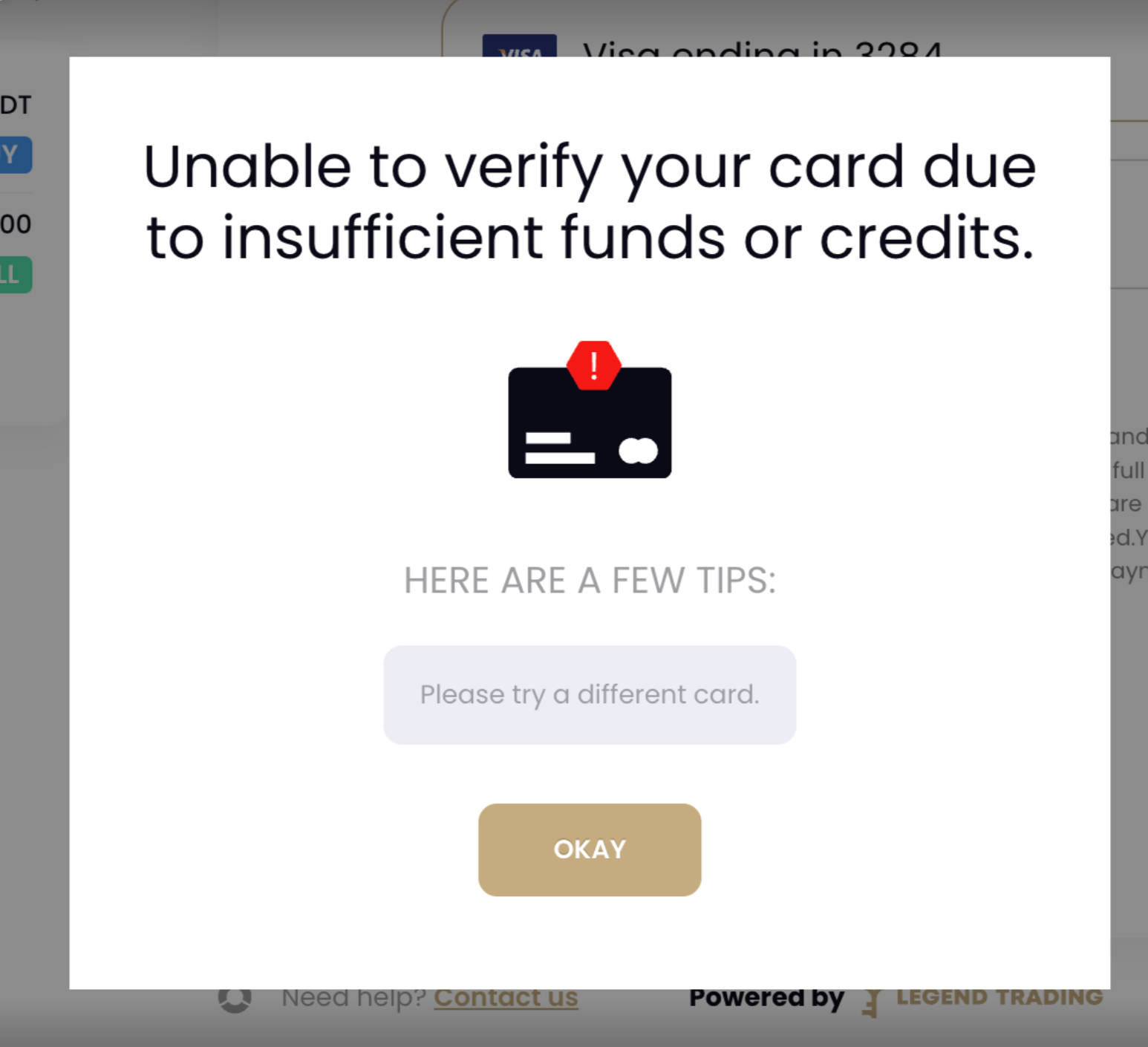
交易失败的情况。
调用orderByFiat()方法进行交易时,有以下的错误。
try...catch捕获错误。
try {
  const resp = await legend.orderByFiat();
} catch (error) {
  // 交易失败

  // 内置的标准错误类型。
  // https://developer.mozilla.org/en-US/docs/Web/JavaScript/Reference/Global_Objects/Error
  console.log(e.name, e.message);

  // 网络请求产生的错误
  // https://axios-http.com/docs/handling_errors
  console.log(e.response, e.request, e.config, e.message);
}- 处理 LegendBase 实例上发射的事件。
legend.on("legend:payment-success", (e) => {
  console.log("legend:payment-success: \n%o", e.data);
});

legend.on("legend:payment-failed", (e) => {
  // 交易失败
  console.log(e);
  // {
  //   subject: "Unable to verify your card.",
  //   message: "Please call the customer support of your issuing bank to make sure the transaction wasn’t incorrectly flagged as fraudulent, or try a different card."
  // }
  //
  // {
  //   subject: "",
  //   message: "1. Double check the card number and details entered.\n2. Follow up with your issuing bank and figure out why the card was declined.\n3. Try a separate card. Debit card has higher successful rate than credit card.",
  // }
});
legend.on("legend:payment-pending", (e) => {
  // 交易失败
});
legend.on("legend:payment-error", (e) => {
  // 交易失败
});
对于交易失败的情况,我们建议参考下面的 UI 提示。
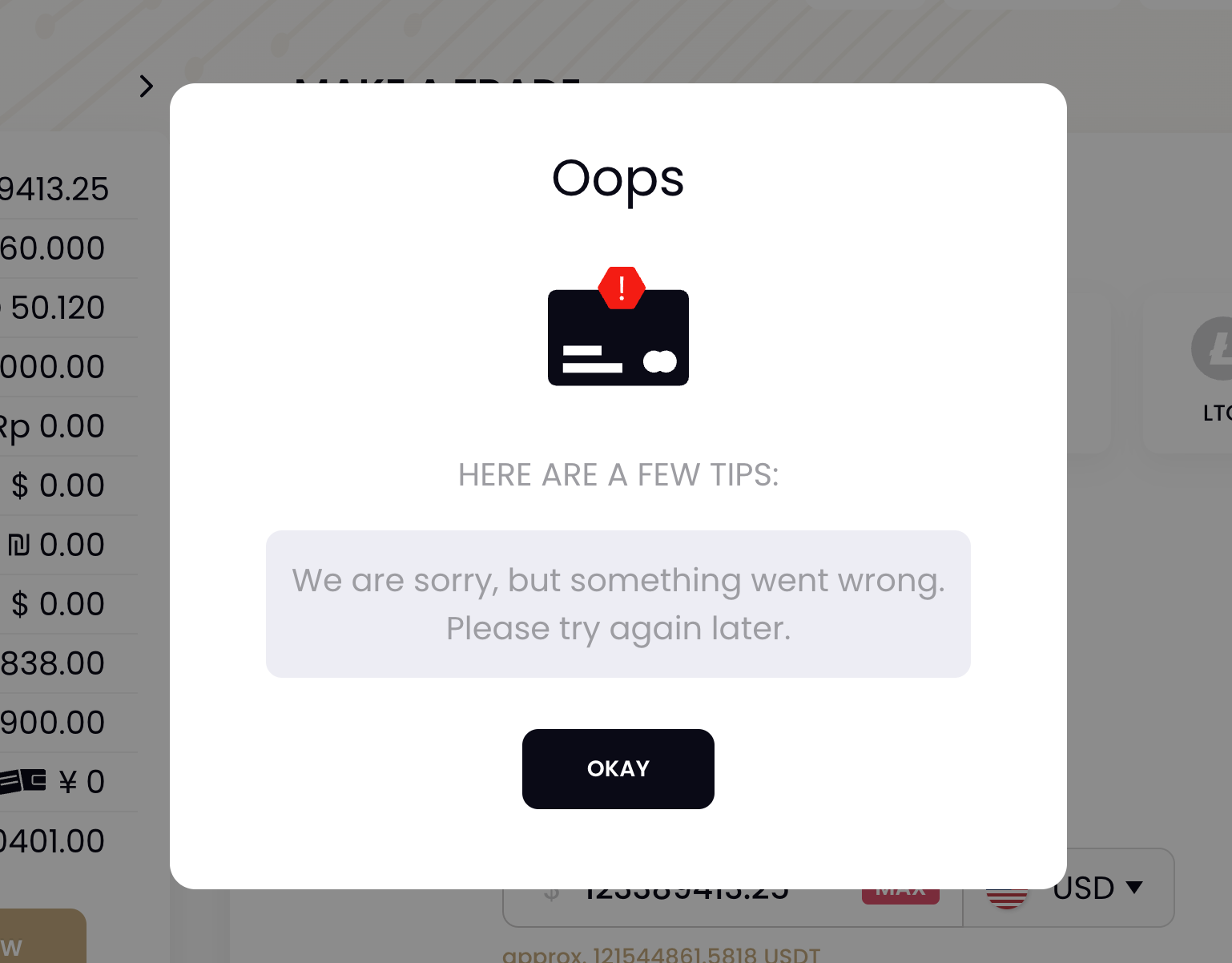
交易失败的提示(通用)
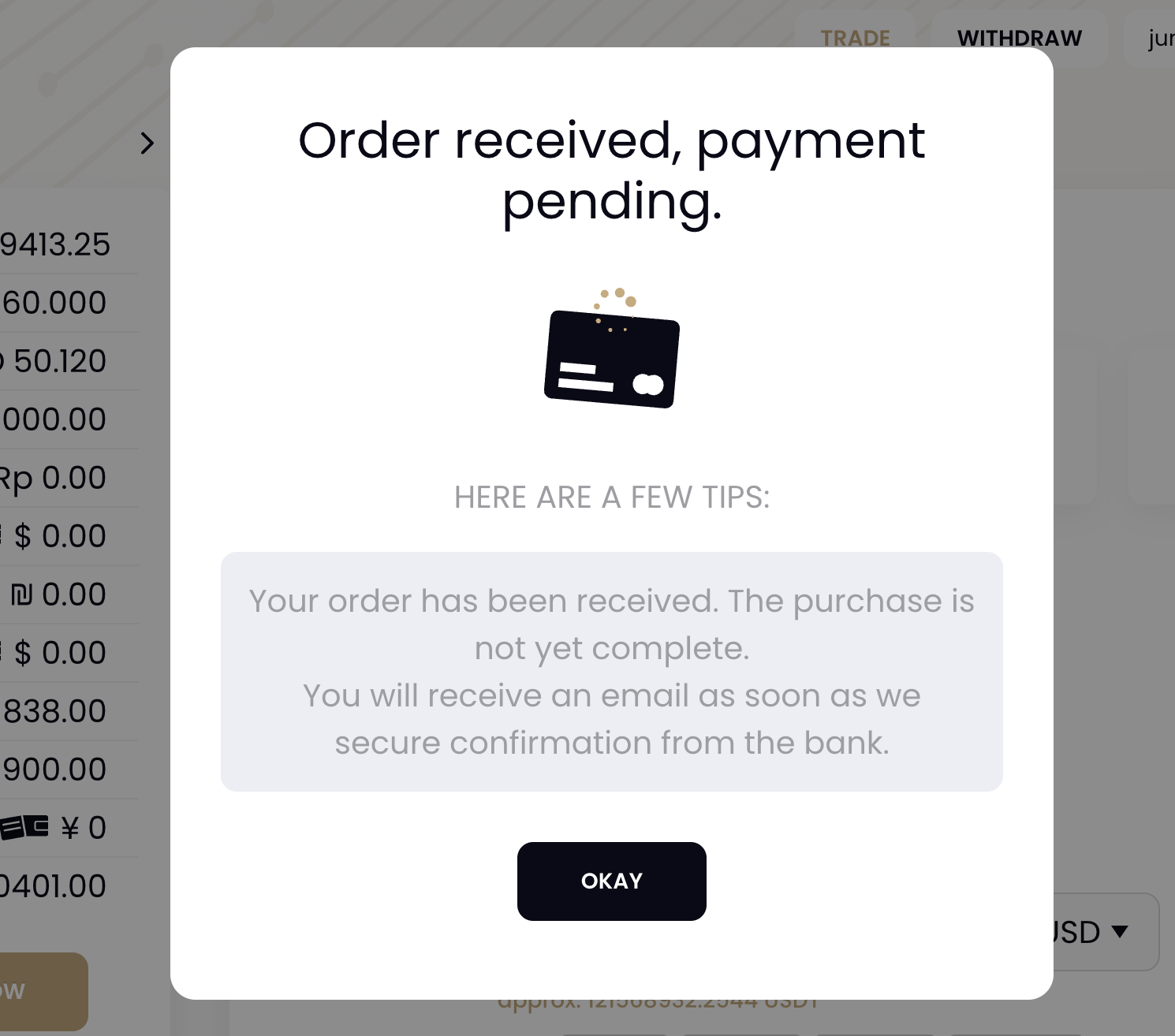
交易错误的提示(等待)
5. 常见问题
- 如何添加 Subresource integrity (SRI) 资源校验功能?
通过使用我们额外的加载脚本可以添加 SRI 兼容的资源加载方式。
详细内容请参考这里。
- 如何配置 Content-Security-Policy (CSP) 响应头?
我们使用以下第三方服务,需要配置 CSP 规则。
详细内容请参考这里。
*.googleapis.com
*.gstatic.com
*.google.com
*.googleusercontent.com
*.googletagmanager.com
*.google-analytics.com
*.analytics.google.com
*.g.doubleclick.net
fonts.googleapis.com

static.zdassets.com
ekr.zdassets.com
ekr.zendesk.com
legendtrading.zendesk.com
*.zopim.com
zendesk-eu.my.sentry.io
*.zopim.com;
v2assets.zopim.io
static.zdassets.com

*.veriff.me
*.veriff.com
*.hotjar.com
*.probity.io

*.checkout.com
js.checkout.com
risk.checkout.com
fpjs.checkout.com
fpjscache.checkout.com
*.sandbox.checkout.com
risk.sandbox.checkout.com
fpjs.sandbox.checkout.com
fpjscache.sandbox.checkout.com

*.worldpay.com
access.worldpay.com
try.access.worldpay.com
*.cardinalcommerce.com
centinelapi.cardinalcommerce.com
centinelapistag.cardinalcommerce.com- 如何使用 Asynchronous Module Definition (AMD) 加载脚本?
因为我们导出了 UMD 类型的模块,可以直接在 AMD 的模块系统中使用。只需要适当的配置即可加载运行
requirejs(['LegendLoader'], function(loader) {
  console.log('amd: ', loader)
})requirejs.config({
baseUrl: 'lib',
paths: {
app: '../app',
LegendLoader: '',
},
})// For any third party dependencies, like jQuery, place them in the lib folder.
// Configure loading modules from the lib directory,
// except for 'app' ones, which are in a sibling
// directory.
requirejs.config({
baseUrl: 'lib',
paths: {
app: '../app',
LegendLoader: 'https://content.legendtrading.com/jssdk-base/loader'
}
});
// Start loading the main app file. Put all of
// your application logic in there.
requirejs(['app/main', 'LegendLoader'], function(main, loader) {
console.log("amd: ", loader);
});onNodeCreated: function(node, config, module, path) {
node.setAttribute('integrity', integrityForModule);
node.setAttribute('crossorigin', 'anonymous');
}6. 在线示例
请点击此处查看 Legend 提供的示例: